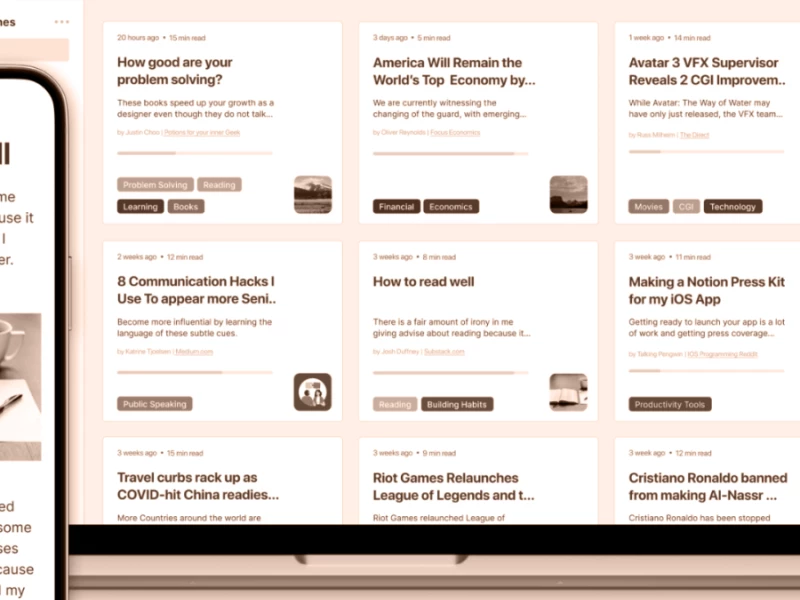
A starter guide for RSS feeds
A starting guide on how to discover RSS feeds, what apps to use, and how to escape the digital algo world.
Last edited on July 27th 2026, to include Gobbler and Bubbles.
Last edited on June 2nd 2026, to add the Kagi small web entry.
We exchanged the friction of discovery and curation for the commodity of the algorithm. The algorithmic interface promise was that it would be better at discovering the things we like. But we already see the results: polarisation, populism, low media literacy and a superficial digital landscape. When there have been repeated investigations (here, here, and here) that show that engagement is driven by negative emotion, how can you trust the algorithm to show you content you like, instead of content that will keep you clicking more?
Switching to subscribing to RSS feeds is not a definitive cure. But it’s a step towards a more independent digital consumption, to a more interrogative mindset and to a diversity of opinions. I wrote about running an independent newsletter/blog in this article.
Let’s discover the RSS way.
What is RSS?
RSS is the thing that powers this digital newspaper. RSS stands for “Really Simple Syndication” or “Rich Site Summary” (depends on who you ask; both are true) and is a web standard that everyone, be it a website, podcast, or newsroom, can use to offer a direct feed of its content to users. It’s easily understood by machines and different software programs. It was created by Dan Libby, Ramanathan V. Guha, and Eckart Walther at Netscape over 25 years ago.
They released the first version, called RSS 0.9, in 1999. Since then, it saw a few iterations, ending up with the most widely used version, RSS 2.0.
Current RSS readers can operate with all versions, and also with concurrent formats such as Atom or JSON.
How to choose an RSS reader?

Maybe you’ve heard of or used Google Reader. It was the main RSS software before the rise of the Big Tech social platform. Launched in 2005 and discontinued in 2013, it gathered a loyal user base, set technical standards, and designed how to interact with a reader. The technology website Techdirt called the closing of Google Reader “one of the defining moments in the shift from a more distributed, independent web to one that is controlled by a few large companies.”
Now, we have a multitude of options, paid or free, as well as web-based, desktop or mobile apps.
The plug-and-play option is to pay for a service. Innoreader (has a free plan), a European solution, has plenty of features; it can be synced between devices, and it is more than enough for anyone who is starting with a blank slate.
If you just want a hosted server with a simple app that can fetch and sync between mobile and desktop, Miniflux is the right choice. It has a minimal interface, and its yearly plan is 15 USD. You can organise the feeds in folders, have a count of unread items on each feed, and a total count of unread items. What I like about Miniflux is the fact that you can connect with other apps. For example, on Android, you can connect with the Miniflutt app(free & open-source, with no tracking), and on macOS, you can connect it with NetNewsWire, while everything stays in sync. Miniflux servers, team, and company are located in France.
Another hosted service is NewsBlur (US-based with a free plan), which has a powerful search, a long-term archive and discovery based on past stories.
If you prefer a local-first reader, my solution will cover most use cases. On macOS, I use NetNewsWire, an open-source and free app. Launched in 2002, it evolved to a native macOS app, being capable of handling big libraries without problems. My feeds list has around 1k feeds, including news websites that generate a lot of activity, and the app works normally. You can sync it via iCloud to iOS and iPad, if you prefer to read on mobile devices. It has a classic three-pane interface, with a dedicated reading view, search and filters, and a powerful parsing engine.
On Linux, I’ve tested NewsFlash (free and open source), which has a similar design to NetNewsWire. I didn’t use it extensively to find annoying issues.
There is also the option to have your feeds in the browser. The Vivaldi browser has integrated a feed reader that works on its mail system. The feeds can be indexed, marked as read and searched like an email.
A new interesting web-based RSS reader is Gobbler. It has ten themes, multiple layouts, full-text search and highlights. Plus, you can have a dedicated email to bring newsletters alongside RSS feeds.
How to add a feed to your reader
The easiest way is to find the RSS symbol on the selected website, click on it, and then save the URL. In most cases, the URL will be composed of: https://example-site/feed.rss or https://example-site/index.xml.
The default place of the RSS symbol is in the website header or footer, close to the other social channel icons. Most readers will recognise the available feeds and subscribe to them. If you are using the Vivaldi browser, it will show you the RSS icon right in the address bar.
There are a few methods to find an RSS feed on websites that don’t have a visible icon or the reader doesn’t recognise the feed’s URL.
If a site is hosted on WordPress, simply add
feedto the end of the URL; for example,https://example-site.com/feed.If a site is hosted on Tumblr, add
/rssto the end of the URL. Like this:htpps://example.tumblr.com/rssIf a site is hosted on Blogger, add
feeds/posts/defaultto the end of the URL. Like this:https://example.blogspot.com/feeds/posts/defaultIf a publication is hosted on Medium, add
/feed/before the publication’s name. Somedium.com/example-sitebecomesmedium.com/feed/example-siteIf a publication is hosted on Substack, add
/feedto the end of the URL. Like this:https://example-site.substack.com/feedTo find the RSS feed of a YouTube channel, first, go to that channel’s home page. Once you’re there, right-click and View Page source (or just use CMD+U / CTRL+U). Use CMD+F / CTRL+F to look for
RSSin the page source. It should look likehttps://www.youtube.com/feeds/videos.xml?channel_id=UC890. Via the View Page source. Right-click on the page, choose Page Source, use CMD+F / CTRL+F, then search forRSSorAtom.Because Beehiiv doesn’t generate the RSS feed by default, the best action is to write to the publication to generate an RSS feed.
On Mastodon, you can follow hashtags through RSS. First, you need to search for a hashtag on a Mastodon server’s website, and then add
.rssat the end of the URL. Then copy and paste it to your reader.The Bluesky accounts have integrated RSS feeds. All you need to do is copy-paste the profile link into the reader, and you’re subscribed.
How to discover new websites, blogs, and people
Some RSS readers have new feed recommendations built in, but if you’re looking for something new or indie, a discovery tool is the way to go.
One of the oldest options is the Ye Olde Blogroll, a human-curated list of people and their blogs.
Marginalia search is a blog-focused search engine. It’s a nice way to discover personal blogs.
Another search engine focused on blogs and podcasts is Feedle. On Feedle, you can generate an RSS feed based on a topic query. Add that feed to your reader, and will have constant updates based on that search.
Scour is a personalised content discovery platform where you can add your interests, and the app will search over 18,781 sources (at the time of writing) to surface the most relevant links.
PowRSS is a feed aggregator with daily updates from blogs and websites. Fairly new, it has a submit policy for blogs and human curation for categories and descriptions.
Link Supply is an aggregator that surfaces links shared on Bluesky. It follows around 2000 accounts, and it has a ranking system based on popularity, freshness and simplicity. Last day’s top 30 links are archived on the homepage. Follow it via RSS.
The open-source Content Management System, Ghost, has an explorable database with all websites that use their software. It has categories and filters, so it’s easy to explore.
With tools like Kill the Newsletter (free app) or Lighthouse (paid plans), you can add email newsletters to your reader. They work as an intermediary between email and RSS by creating a feed that you can use. Fair warning, sometimes these feeds can break, so keep an eye on them.
Kagi, the search engine, has created an index of personal, human-created blogs. This year's update brought categories to the website, mobile apps, and browser extensions. Find it here.
Bubbles is a voting platform for blog entries, similar to HackerNews. It is focused on personal blogs, without ads, gated content or aggregation-type articles. Everyone can read articles via Bubbles, but you’ll need a Fediverse account to vote or comment.
My system for reading feeds
As I said, I have around 1k feeds added in my reader. I bit much, but I’m a curious person.
I heavily use the folder functionality in NetNewsWire to create custom “feeds” on topics. For example, my “News” folder has the main news organisations around the globe, like BBC, The Guardian, Le Monde. I have another folder with updates from different tools where I can follow their change logs. I have a folder called “Shortlist” with all the feeds that I don’t want to miss.
When reading, I scan titles, descriptions, and a few lines, and what I like will be saved into Raindrop, my bookmark manager. What I’m not interested in will be marked as “Read”. The items from Raindrop will be organised in collections, receive tags, and will be read when I have some free moments.
You don’t have to read everything every day. That’s the fun of a non-algorithmic feed, without pressure or the fear of missing something. You can have dedicated moments for selecting or reading, or have custom folders with the most current news.
And you can start sharing them with friends. By the way, this is my feed.
I'm writing the Miscellanea- a newsletter at the intersection of content strategy, tech, and culture and how they influence each other.
Subscribe. (Free, with no spam).
Tagged
You might also like
-
20 Obsidian plugins for writing (Updated)
- Written by Daniel Prindii
- Published on
-
My Omnivore and Obsidian Read it later system
- Written by Daniel Prindii
- Published on
-
My Obsidian plugins selection after 10 months of use
- Written by Daniel Prindii
- Published on
-
How I unshittified my digital life. Big Tech alternatives
- Written by Daniel Prindii
- Published on
-
Read it later alternatives after Omnivore shutting down
- Written by Daniel Prindii
- Published on